
Download FreeGuide TV Guide – Free, Secure, Customizable TV Guide for Windows
Introduction: A Timeless TV Guide for Modern Viewers
For over a decade, FreeGuide TV Guide has stood out as a reliable, lightweight, and free solution for users seeking a straightforward way to manage their TV viewing schedules. Designed specifically for the Windows platform, this software continues to serve audiences in the United States and Spain, offering a no-frills yet effective approach to navigating TV listings. Despite its last update in 2006, the program remains popular among users who value simplicity, minimal resource usage, and a clean interface. With over 11,000 downloads since its addition to the software library in 2006, FreeGuide TV Guide has earned a loyal following among those who prefer a desktop-based TV guide without the clutter of modern streaming apps.
Unlike many contemporary tools that bombard users with ads, push notifications, or complex features, FreeGuide TV Guide focuses on core functionality: displaying broadcast schedules, allowing customization, and integrating seamlessly with existing TV tuner setups. Its small footprint—taking up less space than most programs in the video software category—makes it ideal for older systems or users with limited storage. The software is available in English and supports Windows 95 and earlier versions, making it accessible to users still relying on legacy systems. Whether you're a nostalgic viewer or someone who prefers a minimalist digital experience, FreeGuide TV Guide offers a secure and stable way to stay updated on your favorite shows.
While the software hasn’t seen a recent update, its enduring popularity speaks volumes about its reliability and user satisfaction. For those searching for a free, secure, and customizable TV guide, this tool remains a compelling option—especially for those who want to avoid subscription fees or complicated interfaces. In this review, we’ll explore its features, compatibility, ease of use, and why it’s still worth downloading in 2024.
Key Features and Functional Benefits of FreeGuide TV Guide
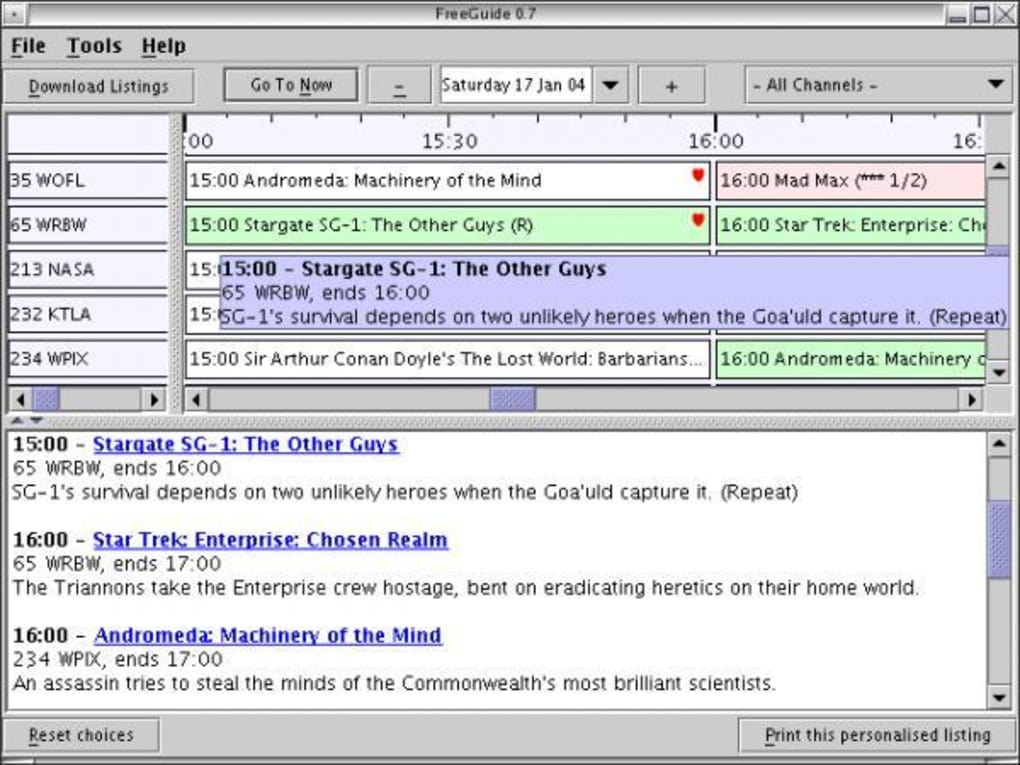
FreeGuide TV Guide may not boast flashy animations or AI-powered recommendations, but its strength lies in its core functionality and user-centric design. The software delivers a clean, intuitive interface that displays TV listings in a simple grid format, making it easy to scan channels and time slots. One of its standout features is the ability to customize the guide layout—users can adjust column widths, choose which channels to display, and even set favorites for quick access. This level of personalization ensures that viewers see only the content they care about, reducing clutter and improving usability.
Another major advantage is its integration with TV tuner hardware. FreeGuide TV Guide works seamlessly with standard analog and digital TV cards, allowing users to not only view schedules but also record shows directly from the guide. This feature is particularly valuable for those who still rely on over-the-air broadcasts or local cable signals. The software supports electronic program guides (EPG) and can import data from external sources, ensuring accurate and up-to-date listings. While the last update was in 2006, the underlying code remains stable, and many users report no issues with performance or crashes.
Additional features include a search function for specific shows, reminder alerts for upcoming episodes, and support for multiple time zones. The program also allows users to export schedules to text or CSV files, which is useful for sharing with family members or backing up data. For those who enjoy organizing their viewing habits, FreeGuide TV Guide offers a simple yet effective toolset that doesn’t require a steep learning curve. Its lightweight nature means it runs smoothly on older hardware, making it a smart choice for users with limited computing resources.
- Customizable interface – Adjust layout, channels, and display preferences
- TV tuner integration – Record shows directly from the guide
- EPG support – Import and display accurate broadcast data
- Search and reminder system – Find shows and get alerts for new episodes
- Exportable schedules – Save listings in text or CSV format
- Lightweight and fast – Minimal system resource usage
Installation, Usage, and Compatibility Overview
Installing FreeGuide TV Guide is a straightforward process, especially for users familiar with older Windows systems. Since the software is designed for Windows 95 and earlier versions, it’s best suited for legacy PCs or virtual machines running older OS environments. The download file is small in size, ensuring a quick transfer even on slow internet connections. Once downloaded, simply run the installer and follow the on-screen prompts. No additional drivers or dependencies are required, which simplifies the setup process.
After installation, launching the program opens a minimalistic window displaying the current day’s TV schedule. Users can customize the guide by selecting preferred channels, adjusting time zones, and setting up recording preferences. The interface is text-based but highly functional, with clear labels and intuitive navigation. For those using a TV tuner card, the software automatically detects the device and syncs with the broadcast signal to populate the schedule. If external EPG data is needed, users can manually import it from supported sources.
Usage is simple: browse the guide, search for a show, set a reminder, or schedule a recording. The program runs in the background without consuming significant CPU or RAM, making it ideal for multitasking. It’s also safe to use—no ads, no bundled malware, and no telemetry. This level of security is rare in today’s software landscape, especially for free tools. While it lacks modern features like cloud sync or mobile access, its desktop-first approach ensures stability and privacy.
Compatibility remains a key consideration. FreeGuide TV Guide is not compatible with Windows 10, 11, or newer systems due to its outdated architecture. However, it can still be used on Windows 98, ME, or through compatibility mode on Windows XP. For users on modern systems, running the software in a virtual machine (e.g., VirtualBox or VMware) is a viable workaround. This allows access to the tool without compromising the host system’s performance or security.
Pros, Cons, and Real-World User Experience
FreeGuide TV Guide has earned a loyal user base for good reason. Its pros are numerous and align perfectly with the needs of minimalist, tech-savvy viewers:
- Completely free – No hidden costs or subscription fees
- Lightweight and fast – Runs smoothly on older hardware
- Secure and ad-free – No malware, no tracking, no bloatware
- Highly customizable – Tailor the interface to your preferences
- TV tuner integration – Record shows directly from the guide
- Simple and stable – Few crashes, no complex setup
However, the software does have some limitations that users should consider:
- Outdated compatibility – Not supported on Windows 10/11
- No mobile or cloud access – Cannot view or manage schedules on phones or tablets
- Manual EPG updates – Requires user intervention for data refresh
- Limited modern features – No AI recommendations or social sharing
- Interface may feel dated – Text-based design may not appeal to all users
Despite these drawbacks, many users appreciate its reliability and simplicity. Real-world feedback highlights its stability over years of use, with minimal bugs reported. It’s especially popular among users who value privacy and control over their data. For those who still rely on over-the-air TV or analog broadcasts, FreeGuide TV Guide remains a practical tool for organizing viewing habits without the complexity of modern streaming platforms.
Frequently Asked Questions (FAQ)
Q: Is FreeGuide TV Guide still safe to download and use?
Is FreeGuide TV Guide still safe to download and use?
Yes, FreeGuide TV Guide is considered safe to use. It has been downloaded over 11,000 times without reported malware or security breaches. The software is free from ads, tracking, and bundled programs, making it a secure choice for users who value privacy.
Q: Can I use FreeGuide TV Guide on Windows 10 or 11?
Can I use FreeGuide TV Guide on Windows 10 or 11?
While FreeGuide TV Guide was designed for Windows 95 and earlier, it may run on Windows 10/11 using compatibility mode or through a virtual machine. However, official support is not available for newer systems.
Q: Does FreeGuide TV Guide support digital TV tuners?
Does FreeGuide TV Guide support digital TV tuners?
Yes, the software integrates with both analog and digital TV tuner cards, allowing users to view schedules and record shows directly from the guide.
Q: How do I update the TV guide data?
How do I update the TV guide data?
Users can manually import EPG data from external sources or use built-in tools to refresh the schedule. Automatic updates are not supported due to the software’s age.
Q: Can I export my TV schedule to another device?
Can I export my TV schedule to another device?
Yes, FreeGuide TV Guide allows users to export schedules in text or CSV format, making it easy to share or back up data.
Final Verdict: A Reliable Legacy Tool Worth Downloading
While FreeGuide TV Guide may not be the most modern solution on the market, it remains a solid choice for users who value simplicity, security, and functionality. Its lightweight design, customizable interface, and seamless TV tuner integration make it a powerful tool for managing broadcast schedules—especially for those on older systems or using over-the-air TV. Despite its last update in 2006, the software continues to deliver a stable and reliable experience.
If you're looking for a free, secure, and customizable TV guide for Windows, FreeGuide TV Guide is definitely worth downloading. Whether you're a nostalgic viewer or someone who prefers a no-frills approach to TV scheduling, this tool offers a unique blend of reliability and ease of use. For users on modern systems, running it in a virtual environment is a practical workaround.
Download FreeGuide TV Guide today and take control of your viewing experience—without the clutter, ads, or subscriptions.







